
Canva Platform Review
Canva is a highly intuitive, template-driven design platform that enables non-designers to create professional graphics, presentations, and videos, widely praised for its ease of use, extensive library, and strong collaboration features. It is an excellent, cost-effective tool for social media and marketing, though it lacks the advanced, pixel-level editing tools found in software like Adobe Photoshop.
Key Strengths
1- Extensive Assets: Access to a massive library of photos, illustrations, icons, and templates.
2- AI Tools: Magic Studio features, including background removal and magic resize, significantly speed up workflows.
3- Ease of Use: An intuitive drag-and-drop interface reduces the learning curve.
4- Collaboration: Real-time, multi-user collaboration allows for efficient team workflows.
5- Value: A very capable free version is available, with reasonably priced Pro options.
Limitations
1- Design Customization: Limited advanced customization options compared to specialized design software.
2- Web Limitations: The website builder lacks robust SEO, marketing tools, and e-commerce capabilities.
3- Export Restrictions: Limited output formats, particularly for complex video editing.
4- Support: Support is limited to email, with no phone support option.
Verdict
Canva is a superb tool for quick, high-quality, and collaborative visual content creation. It is ideal for small businesses, marketers, and nonprofits, but it does not replace professional-grade software for high-end graphic design projects.
With this honest review, you can appreciate thats Canva. If you’re into graphic design, you know Canva. This is one of the most popular tools for beginners and, as you can imagine, it’s also a huge success among affiliates.
All you need to do is to sign up with Canva and access the affiliates’ material. From a guide to help you get started to tips and ad templates, you have plenty of different materials to use to promote this popular software.
One of the best things about becoming an affiliate of Canva is their commission scheme. Just to give you an idea, you’ll get an 80% commission per month if you get a user to sign up for the monthly plan. In case you can get a user to sign up for the annual plan, you’ll get a 25% commission.
1- Commission: 80% on monthly plans and 25% on annual plans
2- Best for: Creators, small businesses, teachers, and social media audiences
3- Pros: Very high monthly commission rate, easy-to-promote tool, large global user base.
☞ CLICK HERE FOR MY #1 AWESOME NICHE. LEGIT WAYS TO MAKE MONEY ONLINE.
Is Canva Potential Tool Graphic Design?
As of 2026, Canva is a premier, AI-powered graphic design tool for quick, collaborative, and professional content creation, boasting over 260 million users. It excels with intuitive, template-driven workflows for social media, marketing, and presentations. Its AI features and Visual Suite 2.0 enhance productivity, making it ideal for non-designers and marketing teams.
Key Strengths in 2026
AI-Powered Design: Canva’s “Magic” tools allow users to generate layouts, edit photos, and resize content rapidly using AI.
Visual Suite 2.0: A major 2026 update allowing users to combine docs, whiteboards, presentations, and social graphics in a single, cohesive project.
1- Brand Management: Pro features like Brand Kit ensure consistency across large teams.
2- Massive Assets: Extensive built-in library of stock photos, videos, and templates.
Limitations
1- Limited Advanced Editing: Lacks deep vector editing, precise layer management, and complex typography options found in specialized software.
2- Offline Access: Primarily cloud-based, restricting usability without internet access.
Conclusion
Canva is excellent for rapid, professional-looking design, but not for complex, heavy customization. It is a powerful tool for social media managers, marketers, and entrepreneurs in 2026.
☞ CLICK HERE FOR MY #1 AWESOME NICHE. LEGIT WAYS TO MAKE MONEY ONLINE.
What’s Canva Platform?
Canva isan online visual communication and graphic design platform launched in 2013, designed to allow anyone to quickly and easily create professional-looking visual content, without needing any prior design experience.
Main Features
The core of the platform is its drag-and-drop interface , which makes it easy to customize a massive library of over 250,000 free templates and millions of graphic elements (photos, icons, and videos).
1- Canva Visual Suite: An all-in-one workspace that includes tools for creating:
2- Social Media: Instagram posts, TikTok videos, YouTube thumbnails, and Facebook banners.
3- Documents and Presentations: Alternatives to Word and PowerPoint with interactive designs.
4- Videos: A simple video editor with one-click animations and transitions.
5- Printed Material: Business cards, flyers, posters, and even designs for t-shirts and mugs.
6- Websites: Creation and publication of simple websites or portfolios.
7- Magic Studio (AI): AI-powered tools such as Magic Media (generating images from text), Magic Eraser (removing objects from photos), and Magic Write (writing assistant).
8- Collaboration: Allows teams to work together in real time, leaving comments and assigning tasks directly on the designs.
Plans and Prices
Canva operates under a freemium model , offering options for different types of users:
1- Canva Free: Access thousands of templates and basic elements with 5GB of cloud storage.
2- Canva Pro: For approximately $15 USD per month (or $120 USD per year), unlock over 100 million premium assets, the “Brand Kit” (saved logos and colors), magic resizing, and 1TB of storage.
3- Canva for Teams: Designed for business collaboration with approval workflows and administrative controls.
4- Canva for Education: Free for teachers and students at K-12 levels (primary and secondary) in eligible institutions.
To get started, you can access it through a web browser or download their apps for iOS, Android, Windows, or macOS.
☞ CLICK HERE FOR MY #1 AWESOME NICHE. LEGIT WAYS TO MAKE MONEY ONLINE.
Pros And Cons Of Canva Platform
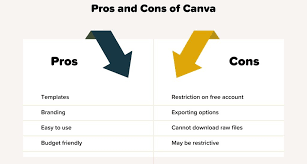
CanvaIt is one of the world’s most popular graphic design platforms, designed primarily for users who are not professional designers . Its main advantages and disadvantages are detailed below:
Advantages (Pros)
1- Extreme ease of use: Its “drag and drop” interface is intuitive, allowing you to create professional content in minutes without any prior technical knowledge.
2- Massive template library: Offers millions of customizable templates for social media, presentations, resumes, videos, and websites.
3- Real-time collaboration: Allows multiple users to edit the same design simultaneously, ideal for remote teams.
4- AI Tools (Magic Studio): Includes powerful features such as automatic background removal, image generation from text, and magic resizing to adapt a design to multiple platforms with one click.
5- Format versatility: It’s not just for static images; it also allows you to edit simple videos, create basic websites, and design products for physical printing.
6- Robust free plan: The free version is functional for most casual users, offering access to thousands of elements and templates.
Disadvantages (Cons)
1- Export limitations: It does not allow exporting files in PSD (Photoshop) format or editable vector files (such as AI), which makes it difficult to work together with designers who use professional software.
2- Limited customization: Unlike Adobe Illustrator or Photoshop, Canva offers less control over complex layers, custom fonts, and advanced drawing tools.
3- Internet dependency: As a cloud-based platform, it is impossible to work without a stable internet connection.
4- Standardized aesthetics: Due to their huge user base, many designs can end up looking generic or similar to those of other businesses.
5- Resume (ATS) Issues: Many of their visual designs are not compatible with the automated resume reading systems (ATS) used by companies, which can be detrimental to candidates.
6- Limited support: Customer service is primarily via email, and response times can be slow for users of the free plan.
☞ CLICK HERE FOR MY #1 AWESOME NICHE. LEGIT WAYS TO MAKE MONEY ONLINE.
Pricing Of Canva Platform
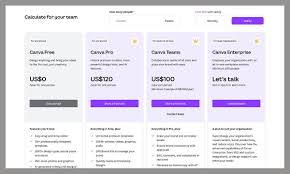
Canva offers a tiered pricing structure, including a robust Free tier ($0), Pro (approx. $15/month or $120/year for individuals), and Teams (starting around $100-$150/year per user, with minimums). Pro includes AI tools and 100GB-1TB storage, while Enterprise offers custom pricing. Free accounts provide 5GB storage and basic templates, says Style Factory and Miracamp.
Canva Pricing Structure (2026 Overview)
1- Canva Free ($0): Suitable for beginners, featuring 5GB cloud storage, over 1 million templates/graphics, and basic design tools.
2- Canva Pro ($14.99–$15/month or ~$120/year): Designed for individuals needing full access. Includes 100GB-1TB storage, Magic
Studio AI tools, brand kits, background remover, and over 100 million premium assets, notes Vendr and Style Factory.
3- Canva for Teams (Approx. $100–$150/user per year): Tailored for collaboration, offering everything in Pro plus team admin tools, brand controls, and shared folders.
4- Canva Enterprise (Custom Pricing): For large organizations needing advanced security (SSO/SCIM), advanced brand controls, and dedicated support, says withorb.com.
Key Features by Plan
1- Storage: 5GB (Free) vs. 100GB–1TB (Pro/Teams).
2- Magic Studio (AI): Limited (Free) vs. Full Access (Pro/Teams).
3- Brand Kit: Limited to 1 Kit (Free) vs. 1,000+ Kits (Pro/Teams).
4- Assets: Access to 4.7M+ vs. 100M+ premium images/graphics.
☞ CLICK HERE FOR MY #1 AWESOME NICHE. LEGIT WAYS TO MAKE MONEY ONLINE.
Do Canva Platform Work?
Yes, the Canva platform works exceptionally well as a user-friendly, web-based design tool, making it ideal for non-designers, marketers, and small businesses to create social media graphics, presentations, and print materials. It features AI-powered tools, a massive template library, and team collaboration features, functioning effectively for quick, high-quality projects without needing advanced design skills.
Key Aspects of How Canva Works:
1- Ease of Use: It utilizes a drag-and-drop interface, making it easy to create professional-looking content quickly, even with no prior experience.
2- Versatility: Beyond basic images, Canva supports video editing, presentations, social media scheduling, and website creation.
3- AI Integration: “Magic Studio” features enable users to generate images, create layouts, and draft copy using AI.
4- Free vs. Pro: A robust free version exists, while Canva Pro ($119/year) provides extra features like background removal, brand kits, and premium assets.
5- Limitations: It is not a replacement for professional design software (like Adobe Illustrator) and may not be suitable for complex, high-resolution printing or intricate design work.
Common Uses:
1- Social Media: Creating engaging posts and thumbnails.
2- Business: Designing flyers, logos, and presentations.
3- Web Design: Building simple, responsive websites and portfolios.
Note: While highly versatile, some users find that Canva’s export options are limited and it may have performance glitches due to being a web-based platform.
☞ CLICK HERE FOR MY #1 AWESOME NICHE. LEGIT WAYS TO MAKE MONEY ONLINE.
Is Good Canva Platform For Beginners?
Yes, Canva is widely considered an excellent, user-friendly platform for beginners, featuring an intuitive drag-and-drop interface, thousands of templates, and robust tools like background removal and magic resize. It is ideal for social media graphics, presentations, and simple design tasks without requiring prior experience.
Why Canva is Good for Beginners:
1- Low Learning Curve: It is easy to learn compared to professional design software.
2- Extensive Template Library: Thousands of pre-designed templates for social media, presentations, and flyers help users start quickly.
3- All-in-One Tool: Includes stock photos, videos, fonts, and graphic elements.
4- Accessibility: Operates in a browser and has mobile app support.
Key Considerations:
1- Free Version Availability: A, free version is suitable for most basic needs.
2- Paid Features: Some advanced features like Brand Kit and Magic Resize are behind a paywall.
3- Best for Content Creation: It is better for assembling, elements rather than creating complex, custom graphics from scratch, say Reddit users.
Who’s Own Of Canva Platform?
Canva is primarily owned and was founded by Melanie Perkins, Cliff Obrecht, and Cameron Adams. As a privately held company, they remain the major shareholders, alongside venture capital firms like Sequoia Capital and Blackbird Ventures. Melanie Perkins serves as the CEO, with the company valued at over $42 billion.
Key details regarding Canva’s ownership:
1- Founders: Melanie Perkins (CEO), Cliff Obrecht (COO), and Cameron Adams (CPO) launched the platform in 2013.
2- Ownership Stake: Perkins and Obrecht (who are married) hold significant stakes, with reports indicating they own roughly 18% each, according to Forbes.
3- Charitable Commitment: The founders have pledged to transfer more than 80% of their stake to the Canva Foundation for philanthropic causes.
4- Company Status: It is a private company based in Sydney, Australia, with major backing from investment firms including Felicis Ventures, Blackbird Ventures, and Sequoia Capital.
☞ CLICK HERE FOR MY #1 AWESOME NICHE. LEGIT WAYS TO MAKE MONEY ONLINE.
What Are The Downsides Of Canva?
What Are the Disadvantages of Canva? – PC GuideCanva is a user-friendly, web-based design tool best suited for basic, quick projects rather than complex, professional design. Its main disadvantages include a mandatory internet connection, limited advanced design features (like custom gridlines or precision tools), and lack of professional file exports (no PSD/vector editing).
Is Canva Safe And Legit?
Canva is SOC2 Type II compliant and is ISO 27001 certified, which requires us to have periodic external audits of our information security management system and security controls. Canva employs specialist external services and tools to conduct multiple different types of security assessments.
☞ CLICK HERE FOR MY #1 AWESOME NICHE. LEGIT WAYS TO MAKE MONEY ONLINE.
Do People Really Make Money Off Canva?
Yes, people frequently make money using Canva through various methods, ranging from side hustles to full-time businesses. Popular approaches include selling digital templates, offering freelance design services, creating print-on-demand products, and participating in the Canva Creators program.
Main Ways to Monetize Canva:
1- Selling Templates: Designing editable templates (social media, planners, presentations) and selling them on platforms like Etsy or Shopify.
2- Freelance Design Services: Offering custom design work such as logos, brochures, and YouTube thumbnails on platforms like Upwork or Fiverr.
3- Print-on-Demand & Printables: Creating designs for merchandise (T-shirts, mugs) or downloadable, printable products like art prints, journals, and calendars.
4- Canva Creators Program: Submitting original templates or design elements directly to Canva for royalties.
Key Tips for Success:
1- Niche Down: Focus on a specific market (e.g., real estate, fitness) to stand out from competition.
2- Understand Licensing: When selling, create designs from scratch, as you cannot resell Canva’s pre-existing templates directly.
3- Build a Portfolio: Showcase your designs on social media to attract clients, as discussed in.
While some users note that competition is high and it can take time to build a consistent income, many find success through high-quality, original designs.
Which Country Uses Canva The Most?
Canva Customers by Geography
The top three geographies of Canva for presentation are the United States with 77,841(60.57%), United Kingdom with 11,352(8.83%), France with 7,314(5.69%) customers respectively.
How To Earn Money At Home Using Canva?
Here are some of the many ways you can make money with Canva:
1- Sell Canva templates. …
2- Design social media assets. …
3- Design logos. …
4- Offer digital marketing support. …
5- Create Canva tutorials. …
6- Sell art prints. …
7- Sell printable educational resources. …
8- Sell printable activity books.
☞ CLICK HERE FOR MY #1 AWESOME NICHE. LEGIT WAYS TO MAKE MONEY ONLINE.
What major companies use Canva?
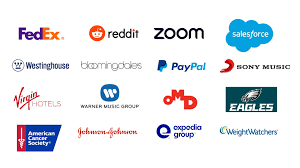
Who uses Canva?
| Company | Website | Country |
|---|---|---|
| Mediavine | mediavine.com | United States |
| DonorSearch | donorsearch.net | United States |
| Tripleseat Software | tripleseat.com | United States |
| GoDaddy Operating Company, LLC. | godaddy.com | United States |
Who Is Canvas’ Biggest Competitor?
Blackboard Learn – Best Alternative to Canvas LMS for in-Depth Reporting and Analytics. With Blackboard Learn, I must say that one of the standout features is its robust learning analytics and reporting capabilities.
☞ CLICK HERE FOR MY #1 AWESOME NICHE. LEGIT WAYS TO MAKE MONEY ONLINE.
Who Is Better Than Canva?
The 7 Best Canva Alternatives
Design AI by SamCart. Design AI is an AI-powered design platform that creates your content for you as you type.
1- Adobe Express. …
2- Visme. …
3- PicMonkey. …
4- Pixlr. …
5- Snappa. …
6- VistaCreate.
Conclusion Of Canva Platform
Final Thoughts: Is A Good Canva?
It has transformed the graphic design landscape by democratizing visual creation for individuals and organizations of all skill levels . What began as a simple drag-and-drop tool has evolved into an AI-powered creative ecosystem that enables the management of complete workflows, from social media to basic websites and video editing.
Key Points of the Platform
1- Accessibility and Simplicity: Its intuitive interface removes the technical barrier of professional tools like Adobe Photoshop or Illustrator, allowing beginners to achieve high-quality results quickly.
2- Content Versatility: Offers a massive library of over 250,000 free templates and millions of graphic elements for presentations, documents, infographics, and printed products.
3- Focus on Collaboration: Facilitates real-time teamwork, allowing simultaneous comments and edits, which is ideal for businesses, educators, and students.
4- Innovation with AI (Magic Studio): The integration of tools such as Magic Write for writing, Magic Media for image/video generation and the background eraser has automated complex tasks.
5- Educational Impact: Canva for Education is a free tool for schools that promotes visual literacy and project-based learning.
Final Conclusion
Canva is the ideal solution for those who need speed, efficiency, and visual consistency without being professional designers. While it doesn’t replace the technical depth required for complex illustrations or professional interface design, it has established itself as the industry standard for everyday visual communication in 95% of Fortune 500 companies.
If you want to chart a successful path in the world of affiliate marketing and if you are ready to learn how to make money with affiliate marketing, to promote products, and to build your online affiliate marketing business, sign up for your free account with Wealthy Affiliate now (no credit card required).
Get Started Now
This trusted platform gives you all the training, tools, and community support you need to move toward a $5,000/month income or $60,000 / year or more.
☞ CLICK HERE FOR MY #1 AWESOME NICHE. LEGIT WAYS TO MAKE MONEY ONLINE.
Join the Conversation.
A mode of information, if you want to learn how to achieve quality visitors to your website and build a list, I recommend you can join: My # 1 Awesome Niche for that you learn by working with affiliate marketing. It really takes time and effort, but it is an honest Program where you will teach you real online marketing. Join at link following:
☞ CLICK HERE FOR MY #1 AWESOME NICHE. LEGIT WAYS TO MAKE MONEY ONLINE.
Thanks so much for your interest.
A. Karell
Are You interested to Build A Solid Future from the comfort of your home?
My #1 Aweome Niche is absolutely the best resource for awesome Start In Online Business, with fast and unlimited cash, and you will learn the Strategic Planning.
To Help You Build A Money-Making Affiliate System. Get a Free Starter now and You can build One Free Website.
Tired of Scams? Click Here To See My #1 Awesome Niche.
Your thoughts and questions matter. If you have any questions or comments about the Canva free to let me know below, or need more help with building your online affiliate marketing business. Thanks for reading this important content on affiliate marketing. Your feedback helps everyone learn and grow.
